Turn Long Videos into Viral Shorts.

The AI clipper that finds your best moments, reframes them to vertical, and adds captions — ready for TikTok, Instagram, and YouTube Shorts. Do it yourself, or point LumiClip at a YouTube or Twitch channel and it clips and publishes automatically. Free to start, no credit card.


Trusted by 5,000+ creatorsNo credit card required
Long video turned into vertical short clips

I used to spend Sunday nights clipping my podcast myself. Now I leave LumiClip pointed at the channel and there's 5-6 clips posted by Monday morning. It just keeps working.

Jordan M.

Podcast host

Jordan M.

We clip for 4 different creators, and auto-publish is the whole reason we switched. Set the schedule once per client and forget it — no more intern babysitting uploads.

Priya R.

Social media agency

Priya R.

Was skeptical about the 'watches your channel' thing, but it's clipped streams I didn't even remember happened. One got 40k views and I found out from the notification, not from doing anything.

Devon T.

Twitch streamer

Devon T.

SEEN ON TIKTOK, REELS & SHORTS

+100K Clips Generated

Every clip below was generated by LumiClip and posted by creators like you — no edits, no retouching.

How it works

From long video to viral shorts

Import a video or point LumiClip at a channel — it clips, captions, and can schedule the posts. The whole pipeline runs while you sleep.
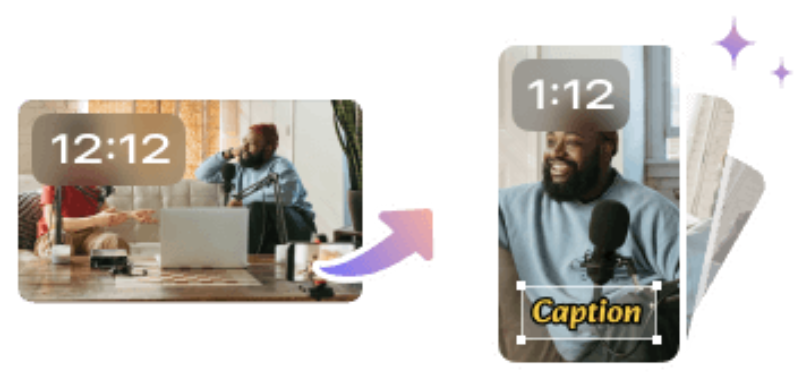
Import video

Import video

Drop a file or paste a YouTube URL — or hand LumiClip a whole channel to watch and it pulls in new uploads automatically. Your video is queued for clipping in seconds.

Auto editing

Auto editing

Hooks, captions, reframes, B-roll, and audio cleanup all happen in a single pass. What you download is ready to post — and you can fine-tune any clip in the editor.

Auto scheduling

Auto scheduling

Pick a cadence per platform once. LumiClip queues to TikTok, Reels, Shorts, and LinkedIn on the schedule you set — including clips from channels it watches.

AI Video Clipping Features

AI features for turning long videos into short clips

Auto-clip, caption, and publish vertical shorts for TikTok, Reels, and YouTube Shorts.

AI features for turning long videos into short clips
Built for every kind of creator

Who is it for

Whatever you film, LumiClip turns it into short-form content you can post today. No timeline, no render wait.

CALLREC
YOU
WEEK
M
T
W
T
F
S
S
Automation users

Auto-clip the creators you love, on autopilot

Pick up to 10 Twitch streamers or YouTube channels. LumiClip watches for new uploads, clips them, and publishes straight to your TikTok, Instagram, Facebook and YouTube — zero manual work.

EP 047 · 90 MIN
9:16
00:42
Podcasters

Turn 90-minute episodes into scroll-stopping shorts

Drop the full episode and LumiClip extracts the punchlines, keeps both speakers framed, and writes captions that actually match the audio.

16:9
9:16
9:16
9:16
YouTubers

Repurpose your back catalogue for Shorts and TikTok

Your old long-form videos are a goldmine. LumiClip's hook-scoring picks the three clips per video most likely to pop on vertical feeds.

LESSON 0342:18
01
02
03
04
45s
CLIP
Course creators

Clip lessons into bite-size teasers

Pull the strongest 45-second takes from every lecture to feed Instagram Reels and LinkedIn, without reshooting a single frame.

BRAND KIT5
A
Aa
B
Aa
C
Aa
+2 MORE
A
B
C
Social media managers

Run five brand channels without timeline fiddling

Each client gets its own preset — fonts, logos, accent colours — and LumiClip applies them automatically on every clip it ships.

WEBINAR
60M
D1
D2
D3
Churches & ministries

Turn long service recordings into shareable clips

Send a full sermon, worship set, or testimony through LumiClip and get short, captioned vertical clips that reach people who weren't in the room.

Loading plans...

Frequently asked questions

LumiClip is an AI video clipper that turns long videos and podcasts into viral short clips — it finds your best moments, reframes them to vertical 9:16, and adds captions for TikTok, Instagram, YouTube Shorts, and more. You can use it two ways. As a hands-on clipper: import any video or paste a YouTube link, and edit every clip yourself in the editor. Or as an autonomous agent: point it at a YouTube or Twitch channel and it clips, captions, and publishes shorts on its own — no timeline to babysit. Most creators use both — generate clips manually when they want control, and let the agent run in the background the rest of the time. It's free to start with no credit card, and it also connects to Claude and other AI tools via MCP.
Yes. LumiClip is an agentic AI clipper: point it at up to 10 Twitch streamers or YouTube channels and it runs the whole pipeline on its own — detecting new uploads, ranking the best moments, cutting vertical clips, writing captions, and auto-publishing to TikTok, Instagram, Facebook, and YouTube Shorts. There's no timeline to babysit; the agent works unattended, and you can still jump in and edit any clip manually when you want.
Yes. LumiClip ships an MCP server so AI assistants like Claude, Claude Desktop, and Cursor can drive it as a tool — send a YouTube link or channel and get back captioned vertical clips as an agent action. Connect via the hosted endpoint at mcp.lumiclip.ai/mcp or the @lumiclip/mcp-server package. See our MCP page to connect it as a connector.
A regular AI clipper waits for you: you upload a video, click generate, review the clips, and post them yourself, every single time. LumiClip is agentic — you set it up once, point it at the channels you follow, and it watches for new content, clips it, and publishes on its own with zero manual steps. You keep the manual upload-and-edit workflow when you want it, but the default is hands-off automation, plus a developer API and MCP server so other agents can call it.
Our model scores every segment on hook strength, speech clarity, visual variety, and emotional peaks, then picks the clips most likely to hold attention in the first three seconds.
No. You can paste any public YouTube or Vimeo link, or drag in a file from your desktop. LumiClip handles the rest — no channel required.
No. Caption style, font, color, reframing ratio, and overlays are all editable per project, and you can save presets so your brand stays consistent across uploads.
Yes. Every clip opens in a lightweight editor where you can retrim, tweak caption timing, swap the B-roll, or change the crop before exporting.
Transcription and caption styling currently cover 30+ languages, with automatic language detection — you don't have to pick one manually.
Your uploads are stored on encrypted object storage and are only processed by our pipeline. We never use customer videos to train models, and you can delete a project at any time.
The free plan lets you process videos up to 60 minutes per month with standard export quality. Paid plans unlock longer videos, HD exports, watermark removal, and scheduled publishing.
Yes. LumiClip starts at $9.99/mo compared to Opus Clip's $29/mo. LumiClip covers the core use case — AI clip detection, auto-captions, and vertical reframing — without the extra features that drive Opus Clip's price up. If you mainly need good clips without the full content suite, LumiClip is the most affordable option.
LumiClip is one of the most affordable AI clip makers with no watermark on paid plans, starting at $9.99/mo. Most competitors like Opus Clip, Vidyo.ai, and Klap start at $20–$49/mo for watermark-free exports. LumiClip's paid plan includes unlimited watermark-free clips, auto-captions, and vertical reframing for TikTok, Instagram Reels, and YouTube Shorts.

Let's Start Clipping.

or